Inside a source
3 min read
Tapping a source in your Library opens its own page: a map of where your entries landed in it, anything you've starred there, and every entry filed to it.
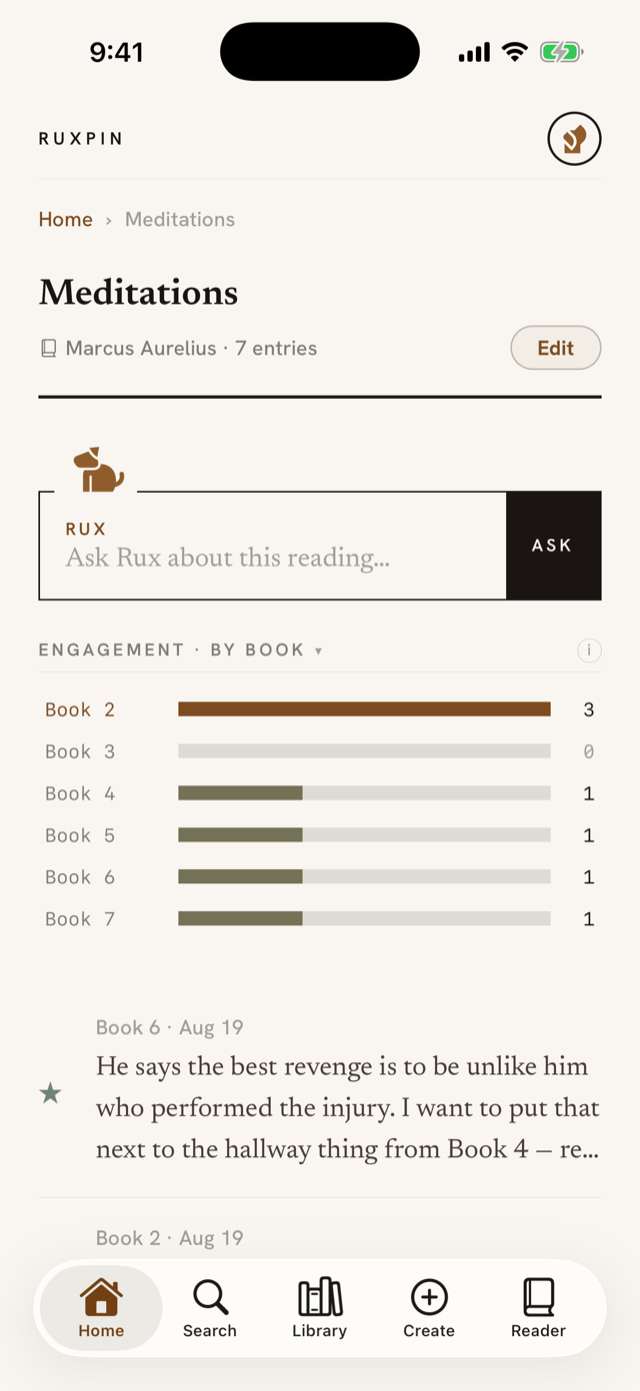
The engagement map
Each row is a stretch of the reading, such as a chapter, a section or a page range, or else a day, when your entries don't carry a place; the bar is how many landed there.
Tap a row and it fills amber while the entries below narrow to just that stretch; tap it again to go back to all of them.
A long reading makes more rows than fit on a screen, so the map scrolls inside its own space rather than pushing your entries down the page. The row cut off at the edge is telling you there's more of it. Scroll the map to its end and keep going, and the page scrolls instead.
Choosing what the map measures
The heading says which axis you're looking at, as in Engagement · by chapter or Engagement · over time, and it's also the control. Tap it and a menu offers every unit this reading can honestly be measured in, plus Over time; your pick is saved with the reading, so it's still there next time and on any other phone you sign in on.
Ruxpin only starts the map on an axis. It opens on whichever unit your entries actually support, which is why one reading arrives measured in chapters and another in days, and that opening choice is what your pick replaces. Switching costs nothing: both views are drawn from what your entries already carry, so nothing is lost either way. Any row you'd narrowed to is released when you switch, since a chapter has no counterpart on a calendar.
Entries with nowhere to sit
Not every entry names a place. You don't always say which chapter you're in, and none of them do when you're capturing a loose thought. Those gather in a row called No locator at the bottom of the map. Tap it like any other row and the entries below narrow to exactly those.
To give one a place, open it, tap Edit, and fill in Where in the reading? with "Chapter 4", "p. 41", or "Book 2". A rough position works too: "40%", "halfway", "three quarters in". Tap Done and it moves out of No locator and onto the map. Clearing the field puts it back.
If a reading has no places at all, the menu still offers By chapter: picking it draws a single No locator row holding everything, which is the map waiting to be filled in rather than an error.
Starred and the rest
Anything you've starred in this reading rises above the other entries, separated by a heavier rule. It's the same pattern as the Library's catalog, and unlabelled for the same reason: the filled star on each row already says why it's up there. See Starring what matters. Narrowing the map to one stretch narrows both halves, so nothing is ever listed twice, and while it's narrowed, a heading appears naming the stretch you picked.
Making something from everything here
Make, with Rux's mark, sits in the small box under the heading beside Edit. It opens what Rux can make from every entry filed here: a study note, or cards to share. A source with nothing filed shows no Make control. A note you have made sits under the title as a paper card. Rux Notes has the rest.
Changing or deleting the source
Edit, in the same box, turns the source's own heading into fields: its title, its author, and its kind. Nothing slides over the page. You correct the words where they sit, and Done saves them.
Deleting is separate, at the very bottom of the page: Delete this source. It takes the source and every entry filed under it, and asks first. See Filing entries and managing sources.